Framework
The internal structure of Pixyz is built to handle different types of product structures, geometry types and heavy algorithms thanks to a custom made and extensible architecture. Pixyz is entirely coded in C++. For high precision, Pixyz computes numbers in the double-precision floating-point format for most of its data structures.
The internal structure of Pixyz supports, among others, these data types:
Modules
Pixyz API is organized into functional libraries that are referred to as modules:
Entities
Pixyz API isn't strictly speaking object-oriented. Pixyz works with references to entities inside the framework. These references are IDs of unsigned int type. This processing simplifies the handling of objects that live within the framework, but requires to explicitly create or gather objects, and then to destroy them.
This diagram shows a simplified view of Pixyz's entity structure:
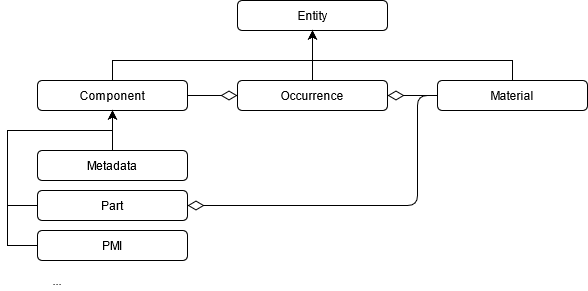
Entities are abstract objects that are defined by an unsigned integer ID. All occurrences, materials, and components have an ID property. Each ID is unique. Most functions take an ID or a list of IDs as input. Some functions can take entities of all types as input. In other words, you can indiscriminately use these functions to access occurrences, materials, and parts. Examples are these functions:
Occurrences
The nodes in the product structure are referred to as occurrences. Most of the optimization functions take an occurrence or a list of occurrences as input.
This table shows examples:
| Function | Description |
|---|---|
| algo.tessellate([1], …) | Specify [1] to run the algorithm on all the direct and indirect child occurrences of this occurrence. |
| scene.getRoot() | Use this function to retrieve the root occurrence of your scene. |
| scene.findOccurrencesByProperty(property, regex) | Use this function to find occurrences that have a specific property. |
Tip
To retrieve all the occurrences in the scene or the recursive children of an occurrence, use the scene.findOccurrencesByProperty method with these parameters:
- The
"Name"property - This regular expression to find all properties:
".*"
This table shows the properties of occurrences:
| Property | Type | Description |
|---|---|---|
| Id | Ident | A unique unsigned int identifier |
| Name | String | The name of this occurrence |
| Visible | InheritableBool | The visibility status of this occurrence |
| Material | Entity | The optional material of this occurrence |
| Transform | Matrix4 | Local transform matrix of this occurrence, storing local position, rotation and scale information |
| Prototype | Entity | Prototype occurrence. If exists this occurrence inherits from its prototype's properties |
An occurrence that's instantiated elsewhere in the product structure is referred to as a prototype. References to a prototype are referred to as instances.
To instantiate an occurrence and its subtree, use the scene.prototypeSubTree function. The returned subtree shares the same components, geometries, and materials as the prototyped subtree.
Materials
Materials are entities that contain visual definitions. Materials can be attached to part components or occurrences. Use core.setProperty(occ, "Material", str(materialId)) to set an occurrence material property (value can be set to "0" to clear the property).
They're defined by a pattern and properties that are specific to each pattern:
PBR pattern
This table shows the properties of PBR materials:
| Property | Type | Description |
|---|---|---|
| Name | String | |
| albedo | ColorOrTexture | |
| normal | ColorOrTexture | |
| metallic | CoeffOrTexture | |
| roughness | CoeffOrTexture | |
| ao | CoeffOrTexture | |
| opacity | CoeffOrTexture | |
| emissive | ColorOrTexture | |
| Id | Ident | A unique unsigned int identifier |
| DepthTestEnabled | Boolean | |
| BackFaceMode | Enum: |
|
| R | Boolean | Red mask |
| G | Boolean | Green mask |
| B | Boolean | Blue mask |
| A | Boolean | Alpha mask |
Components
Components are abstract behaviors that are attached to occurrences.
To retrieve component IDs, use these methods:
To refer to components by their type, use this enum: scene.ComponentType
Parts
Parts are components that contain geometry information, such as information related to CAD, meshes, lines, and UVs.
To retrieve these attributes, use definitions. This example shows how to retrieve the position of vertices of a mesh (Mesh) through its definition (MeshDefinition):
part = pxz.scene.getComponent(occurrence, pxz.scene.ComponentType.Part)
# "part == 0" means that the occurrence doesn't have a part component.
if (part > 0)
{
    mesh = pxz.scene.getPartMesh(part)
    # "mesh == 0" means that no mesh is attached to the part.
    if (mesh > 0)
    {
        # Queries geometry information from meshes.
        meshDef = pxz.polygonal.getMeshDefinition(mesh)
        vertices = meshDef.vertices
        # …
    }
}
To duplicate a part, use the core.cloneEntity method. This snippet shows how to create a new occurrence that shares the same part component as its input:
# Gets the components to be duplicated.
partComponent = pxz.scene.getComponent(occ, pxz.scene.ComponentType.Part)

# Creates an occurrence.
lod = pxz.scene.createOccurrence("_LOD1")

# Sets the part component of the cloned occurrence as the part component of the new occurrence.
pxz.scene.setComponentOccurrence(pxz.core.cloneEntity(part), lod)
pxz.scene.setParent(lod, occ)
This type of part can be particularly useful to generate LODs.
Tip
To retrieve all part occurrences under the root occurrence, use this function:
scene.getPartOccurrences(root)
Part occurrences are occurrences that contain a part component.
This table shows part properties:
| Property | Type | Description |
|---|---|---|
| Id | Ident | A unique unsigned int identifier |
| BRepShapeInitial | Entity | Original CAD geometry data before tessellation |
| BRepShapeModified | Entity | |
| TessellatedShape | Entity | Mesh information |
| Transform | Matrix4 | Local transform matrix of this part component, storing local position, rotation and scale information |
Metadata
Metadata are components that store basic key-value information that is retrieved from imported files. Use the API to add, modify, and delete metadata.
To access this information, use these functions:
To directly extract this information, use this function:
To retrieve occurrences that match specific metadata, use this function: