Create a Custom UI
Once the initial setup of the PixyzUI and its virtual environment is complete, launching main.py will automatically open a default UI from default_ui.py. It contains many useful windows that you might know from other applications, like a scene hierarchy, an inspector, a list of all materials or a uv viewer. However, as the sources of PixyzUI are included in the sdk, you can modify and extend them as you wish. Moreover, creating a personalized viewer with a custom UI is extremely simple and can be a useful step in pipeline validation.
This document aims to enable you to make your own modifications to the PixyzUI in order to develop a personalized application.
Create a Simple Viewer
As you can see in main.py, the default UI is opened and run after importing the sdk. This will automatically create all the windows in imgui and add them to PixyzUI. It also defines a default layout and instructs PixyzUI to store the modifications on closure in a specific location. In essence, it is forming another layer on top of PixyzUI, which we don't need to create a simple viewer.
Let's modify main.py to open a window with just the Pixyz Viewer and a few gizmos. Instead of importing, instantiating and executing DefaultUI, we will use the PixyzUI class:
# We don't need this anymore:
# from pxzui.default_ui import DefaultUI
# default_ui = DefaultUI()
# default_ui.run()

from pxzui.pixyz_ui import PixyzUI
pixyz_ui = PixyzUI()
pixyz_ui.run()
This will open a simple window containing nothing but a viewer, gizmos and some basic functionality. Try importing a file via io.importScene before opening the UI to inspect the model. It also supports importing a model via drag&drop.
Extend PixyzUI with your own widgets
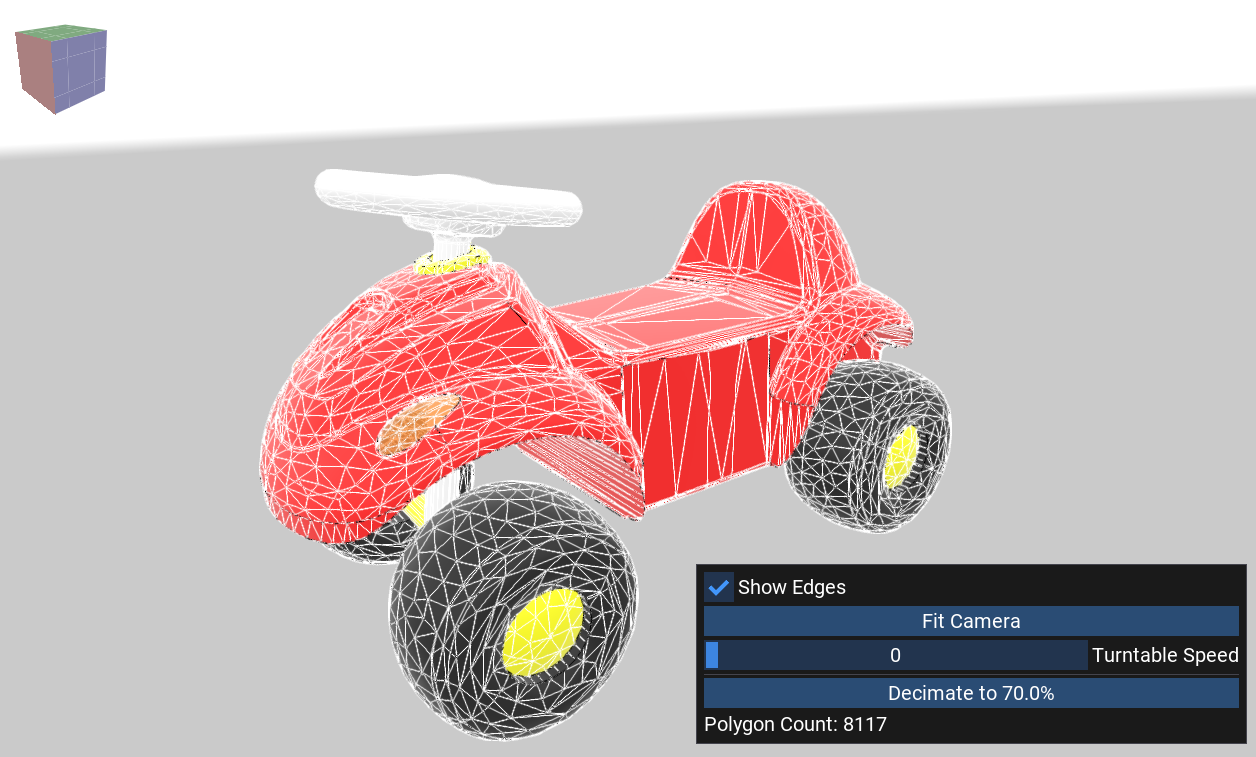
To create your own imgui windows, you need to attach them to the PixyzUI before executing it. PixyzUI uses imgui-bundle, enabling the creation of complex user interfaces with just a few lines of code. Here's an example on how to create a window with a background viewer and a few buttons to reduce its triangle count via decimation. It extends the simple viewer from the previous sample with a few lines to draw a customized window.
from imgui_bundle import imgui
from pxzui.ui.pixyz_ui_events import PixyzUIEvent
from pxzui.window import Window
from pxzui.pixyz_ui import PixyzUI

pixyz_ui = PixyzUI()
pixyz_ui.emit(PixyzUIEvent.FIT_VIEWERS_EVENT)

# Prevent idling
pixyz_ui.idle_flags.add_flag("camera_rotation")
pixyz_ui.idle_flags.set_flag("camera_rotation", True)

# Custom window definition
custom_window = Window("My Window")
custom_window.flags = imgui.WindowFlags_.always_auto_resize | imgui.WindowFlags_.no_resize | imgui.WindowFlags_.no_collapse | imgui.WindowFlags_.no_title_bar
custom_window.enabled = True

# Window function
turntable_speed = 20
show_edges = False
poly_count = pxz.scene.getPolygonCount([pxz.scene.getRoot()])
def custom_window_function():
    # Will be executed every frame
    global turntable_speed, show_edges, poly_count

    # Show mesh edges to see the decimation effect
    show_edges_changed, show_edges = imgui.checkbox("Show Edges", show_edges)
    if show_edges_changed:
        pxz.view.setViewerProperty("ShowEdges", str(show_edges), pixyz_ui.background_viewer.viewer_id)

    # Center the camera to the model
    if imgui.button("Fit Camera", imgui.ImVec2(imgui.get_content_region_avail().x, 0)):
        pixyz_ui.emit(PixyzUIEvent.FIT_VIEWERS_EVENT)

    # Change the turntable speed
    _, turntable_speed = imgui.slider_int("Turntable Speed", turntable_speed, 0, 100)
    pixyz_ui.background_viewer.camera.rotate(turntable_speed/10000, 0.0)
    pixyz_ui.emit(PixyzUIEvent.VIEWER_FORCE_UPDATE_EVENT)

    imgui.separator()

    # Decimate the model to the given ratio when the button is clicked
    ratio = 70.0
    def decimate():
        global poly_count
        pxz.algo.decimateTarget(occurrences=[pxz.scene.getRoot()], targetStrategy=['ratio', ratio])
        poly_count = pxz.scene.getPolygonCount([pxz.scene.getRoot()])
    if imgui.button("Decimate to " + str(ratio) + "%", imgui.ImVec2(imgui.get_content_region_avail().x, 0)):
        pixyz_ui.process_queue.enqueue(decimate)

    # Display the polygon count
    imgui.text("Polygon Count: " + str(poly_count))

custom_window.gui_function = custom_window_function
# Add custom window to Pixyz UI
pixyz_ui.add_window(custom_window)

pixyz_ui.run()
Here's the final result: